
Hostinger WordPress Hosting Review in 2025
Hostinger is one of the leading web hosting providers, offering a variety of hosting services aimed at small businesses, freelancers, and enterprises, and serving customers in more than 150 countries.
One of its most popular services is managed WordPress hosting, which includes 1‑click WordPress installation, LiteSpeed acceleration, an AI website builder, WooCommerce store support, weekly backups, a free domain, free SSL, and free migration – all at an affordable price point.
I recently reviewed the Hostinger Website Builder and found that it works great for building SEO‑optimized, professional‑looking sites. Now, it’s time to take a closer look at its dedicated Hostinger WordPress offering.
In this Hostinger review, we’ll dive deep into what the Hostinger WordPress hosting solution provides — especially around performance, security, customer support, backups, and cost — so you can decide if it fits your WordPress project.
Features
- Excellent server performance with LiteSpeed and Object caching
LiteSpeed’s built‑in cache engine and object caching ensure faster page rendering and reduced server load, particularly for dynamic WordPress sites. - Strategically placed Global datacenters with proper rerouting
By routing visitors to the nearest data center, Hostinger keeps latency low and helps maintain consistent performance across different regions. - 250+ global CDN locations worldwide
With such a large CDN footprint, static assets like images, CSS, and JavaScript are served from edge locations close to your users, improving perceived speed. - Unlimited bandwidth
Unlimited bandwidth means you don’t have to worry about traffic overage fees, as long as you stay within Hostinger’s fair‑use policy. - 1-click WordPress installation and free pre-built templates
This makes it easy for beginners to launch a new site quickly without dealing with manual setups or complex configuration steps. - Top-notch security with DDoS protection, WAF, and Cloudflare-protected nameservers
These layers of protection act as a strong first line of defense against common online threats targeting WordPress sites.
Pros
- Fast load times
Optimizations like LiteSpeed, caching, and CDN integration help most sites load within the recommended 2‑second threshold. - Affordable pricing
Long‑term plans are aggressively priced, making managed WordPress hosting accessible even to solo bloggers and small startups. - Offers free domain, free SSL, and free CDN
These free add‑ons reduce your overall cost of ownership and simplify the onboarding process for new websites. - Daily and weekly backups (7 days retention)
Automated backups give you a safety net in case of accidental changes, plugin conflicts, or security incidents. - Easy-to-use control panel
Hostinger’s hPanel is simpler than classic cPanel and more approachable for non‑technical users. - Developer-friendly with GIT, staging, and SSH support
These tools make it easier to follow modern development workflows and deploy changes safely. - 24/7 customer support via live chat
Around‑the‑clock availability is helpful if your audience or team is spread across multiple time zones.
Cons
- Scalability can be an issue due to shared hosting
Since resources are shared, very resource‑heavy applications may eventually need to upgrade to VPS or cloud hosting. - Not suitable for handling high-traffic sites
Extremely high‑traffic sites or mission‑critical projects are better served by dedicated, VPS, or cloud environments.
You can trust Geekflare
Geekflare tested Hostinger by hosting a WordPress site. We evaluated its speed, uptime, security, and ease of use. Our hands-on testing and user feedback provide an unbiased review of Hostinger’s reliability for businesses and developers. Learn how we test.
6 Reasons To Use Hostinger for WordPress Hosting
Hostinger WordPress hosting comes with plenty of key features. The top 6 reasons that make Hostinger an excellent option for WordPress hosting are given below. Together, they create a balance of performance, usability, and cost that appeals to both beginners and experienced users.
1. Fast Loading WordPress Sites
Hostinger is one of the fastest WordPress hosting providers I have tested. Even at affordable pricing, Hostinger doesn’t compromise on its performance, providing exceptional value for money.
Some key reasons behind Hostinger’s performance include the following:
- LiteSpeed caching for WordPress (LSCWP): Hostinger supports LSCWP and LiteSpeed web servers that directly improve website performance. For ease of use, the WordPress site comes with an LSCWP cache plugin. This helps reduce server response times and speeds up delivery of cached pages.
- Object caching with LSMCD: Hostinger further improves performance with object caching, where the site’s content is pre‑stored for faster retrieval. It can be enabled via the LSCWP WordPress plugin. This is particularly beneficial for dynamic sites that make frequent database queries.
- Global data centers and data center rerouting: Access to strategically placed data centers in the USA, Europe, and Asia. It’s smart enough to select a data center location for your target audience as well. They also offer data center rerouting to a new geographical location if you need better performance or reduced site latency.
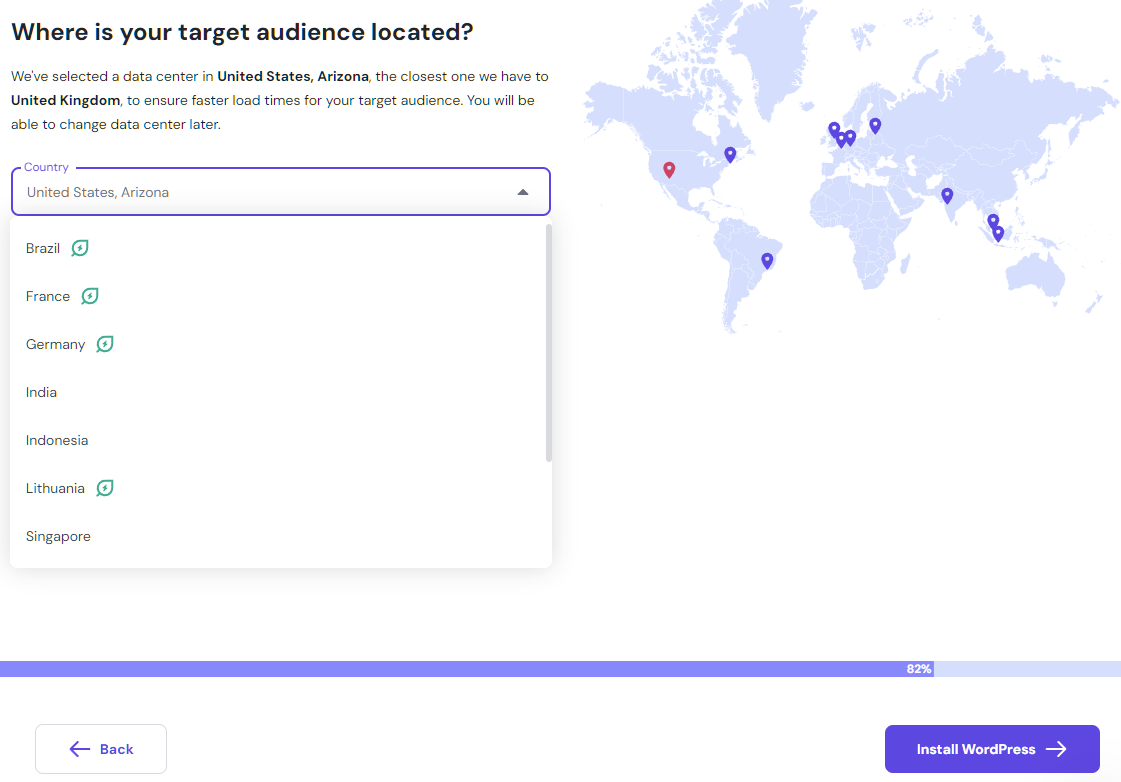
- CDN support: Comes with Cloudflare CDN with servers across 250 locations worldwide, ensuring fast load times across the globe. This reduces the distance between your visitors and your content, even during peak traffic periods.
- Temporary boost resources: Offers a temporary performance boost for 24 hours per month that provides additional resources for handling traffic spikes, testing higher tiers, or processing larger data volumes without upgrading permanently.
My tests revealed that Hostinger can load sites quickly and well within the threshold of 2 seconds. With a 100% uptime guarantee, you’ll find Hostinger reliable and trustworthy.
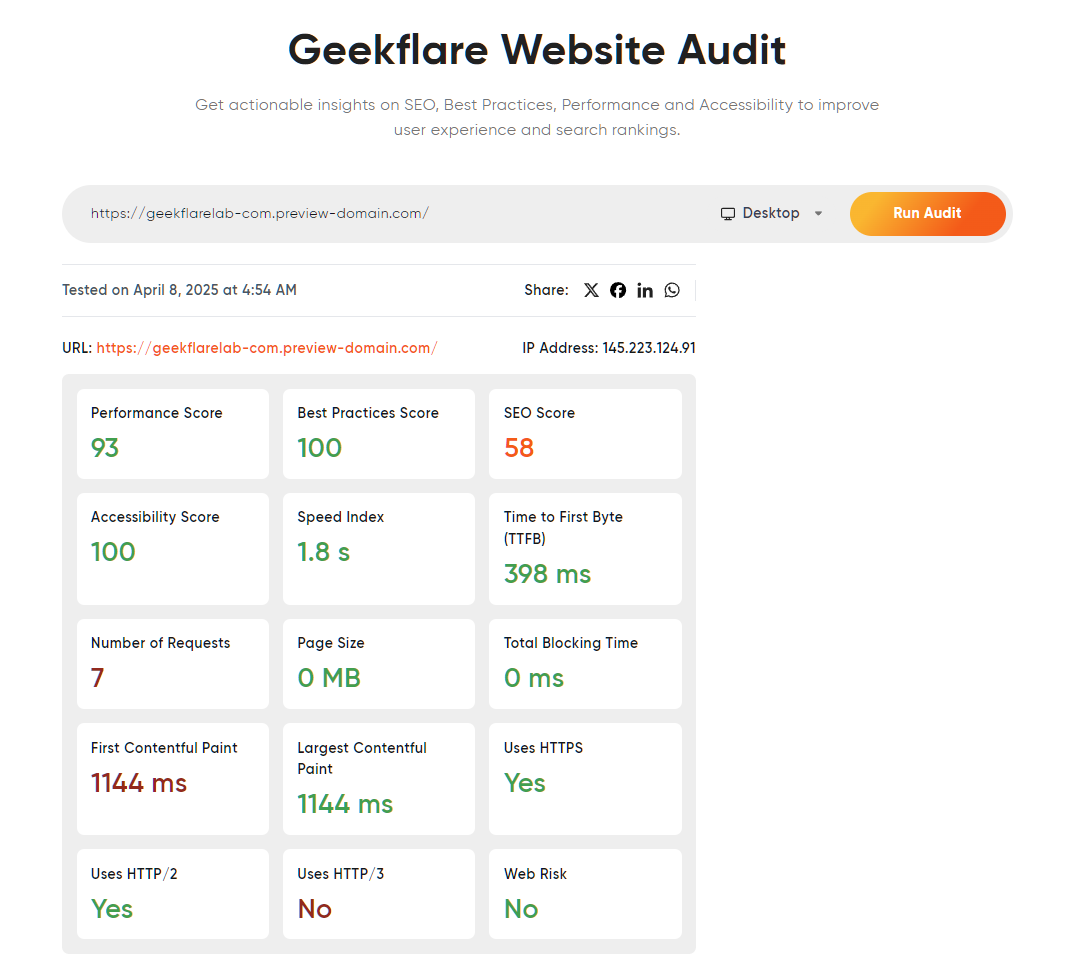
Our Geekflare Website Audit tool returned great results as well.
KeyCDN performance tests look excellent out of the box. These tests are run with the default WordPress theme and a few plugins.
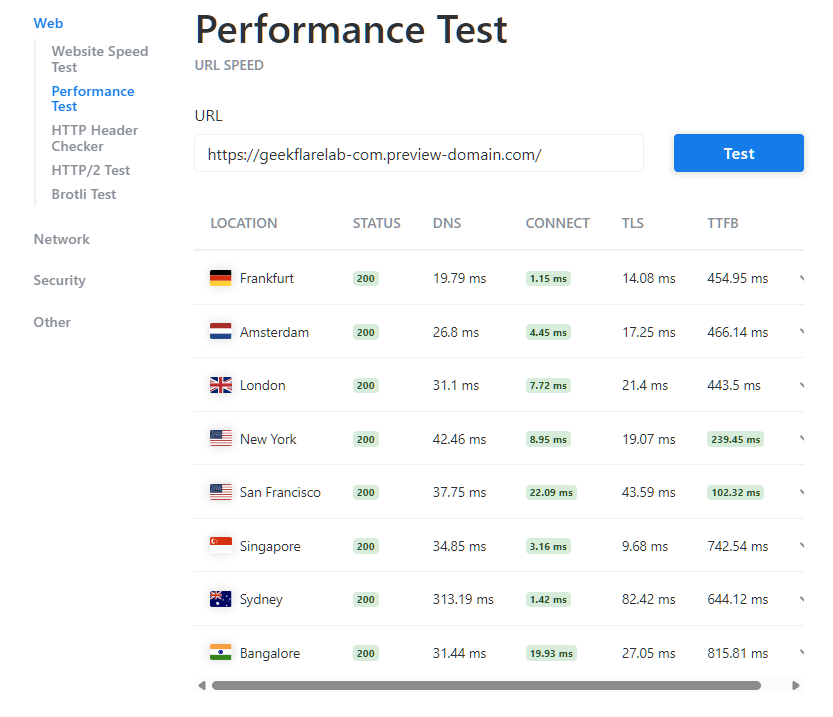
Undoubtedly, the vanilla performance is excellent! Hostinger does stand up to its reputation for offering high performance at an affordable price.
To test load times, I loaded the test site on GTmetrix. It was fully loaded in 1.6 seconds with a TTFB of 438 ms.
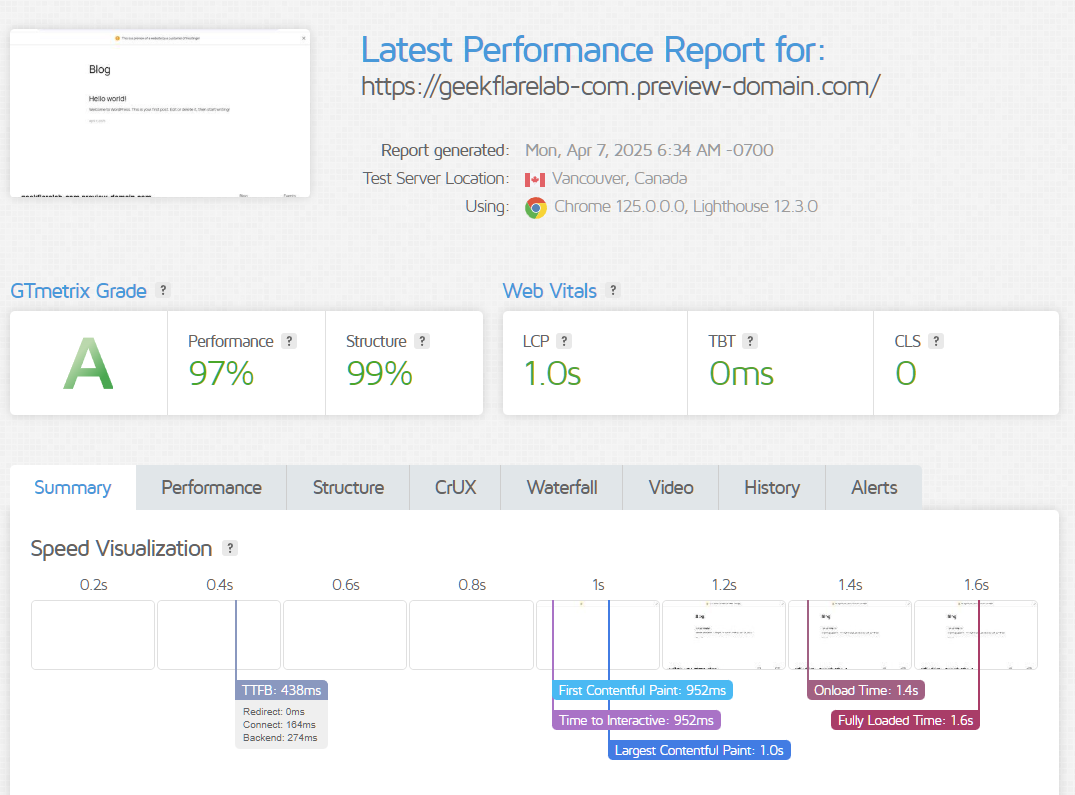
All test results strongly suggest a performance‑optimized server and WordPress shared hosting environment. It should enable any small to medium business to host their site with confidence that it’ll load fast and deliver a top‑notch user experience.
2. Free Stuff
Hostinger WordPress shared plans come with many free benefits, including:
- Free domain: All plans come with a free domain for the 1st year. They offer free domain registration, and you only need to pay from the 2nd year onwards. This is ideal if you’re launching a brand‑new website and want to keep initial costs low.
- Free business email: Offers 100 domain‑based email addresses free of cost. This allows you to create professional‑looking email accounts for your team without purchasing a separate email hosting plan.
- Free SSL: Unlimited free SSL for any number of sites with no renewal cost. HTTPS is essential for SEO and user trust, so having SSL handled automatically is a big plus.
- Free website migration: Migrate your WordPress or other open‑source sites free of cost. All you need to do is submit a request, and the Hostinger team will take care of the rest, reducing the risk of downtime or migration errors.
- Free CDN: Get Hostinger’s free CDN that optimizes site load times by strategically caching content on multiple servers globally.
- Unlimited bandwidth: No bandwidth limitations for any of the hosted sites (must be under their fair‑use policy that ensures no user negatively impacts the server’s performance for others).
- Free pre-built templates: Get access to highly customizable and SEO‑ready pre‑made templates. These templates offer fully functional designs, preview options, and ease of use, helping you launch professional sites in less time.
- 1-click WordPress installation: Install WordPress with a 1‑click option so that you can make your site live instantly, even if you don’t have technical experience.
Apart from these, Hostinger offers:
- Free Amazon affiliate WordPress plugin.
- Free 1‑click Google Analytics integration.
- Free domain WHOIS privacy protection, which helps protect your personal data from being publicly exposed in domain records.
3. Security
WordPress is not only the most popular CMS but also secure. However, WordPress security relies heavily on how the hosting provider implements additional security measures.
Hostinger knows that, and hence offers comprehensive website security for all its WordPress hosting plans. These include:
- DDoS protection: Hostinger WordPress offers out‑of‑the‑box DDoS protection. They use advanced hardware firewalls to filter out malicious traffic. Hostinger deploys two types of DDoS protection: Standard and Enhanced. The Standard layer protects against common DDoS attacks, whereas Enhanced DDoS protection uses CDN capabilities and additional security layers to protect against large‑scale and more sophisticated attacks.
- Web application firewall (WAF): By default, Hostinger enables ModSecurity WAF to improve web app security, protecting against common web security threats such as cross‑site scripting (XSS) or SQL injection.
- Cloudflare-protected nameservers: To protect nameservers from DDoS, Hostinger uses Cloudflare, which mitigates malicious traffic through Cloudflare’s global network and helps keep your DNS available.
Apart from these, Hostinger additionally provides:
- A malware scanner that scans sites daily for early detection and removal.
- Secure access manager for safe collaboration and controlled access for team members or external developers.
- Free domain WHOIS privacy protection.
These security features help you reduce the risk of common WordPress vulnerabilities without relying solely on third‑party plugins.
4. Backup
I like how Hostinger takes backups seriously. They offer daily (available on Business and higher hosting plans) and weekly backups. Additionally, you can set up on‑demand backups for complete peace of mind.
All backups are stored for 7 days, after which they are deleted. Moreover, these backups don’t take up your hosting storage and are stored separately. This separation ensures backups are still available even if you accidentally fill your main disk space.
5. Easy-to-Use Control Panel
I found Hostinger’s custom hPanel easy to use. As soon as you log in, you feel welcome on its Home screen. It’s navigable and offers quick access to your hosting plans and domains.
Its widget system enables anyone to customize the home page to their needs. For example, I added performance score, network performance, and resource usage widgets, helping me keep tabs on these important metrics at a glance.
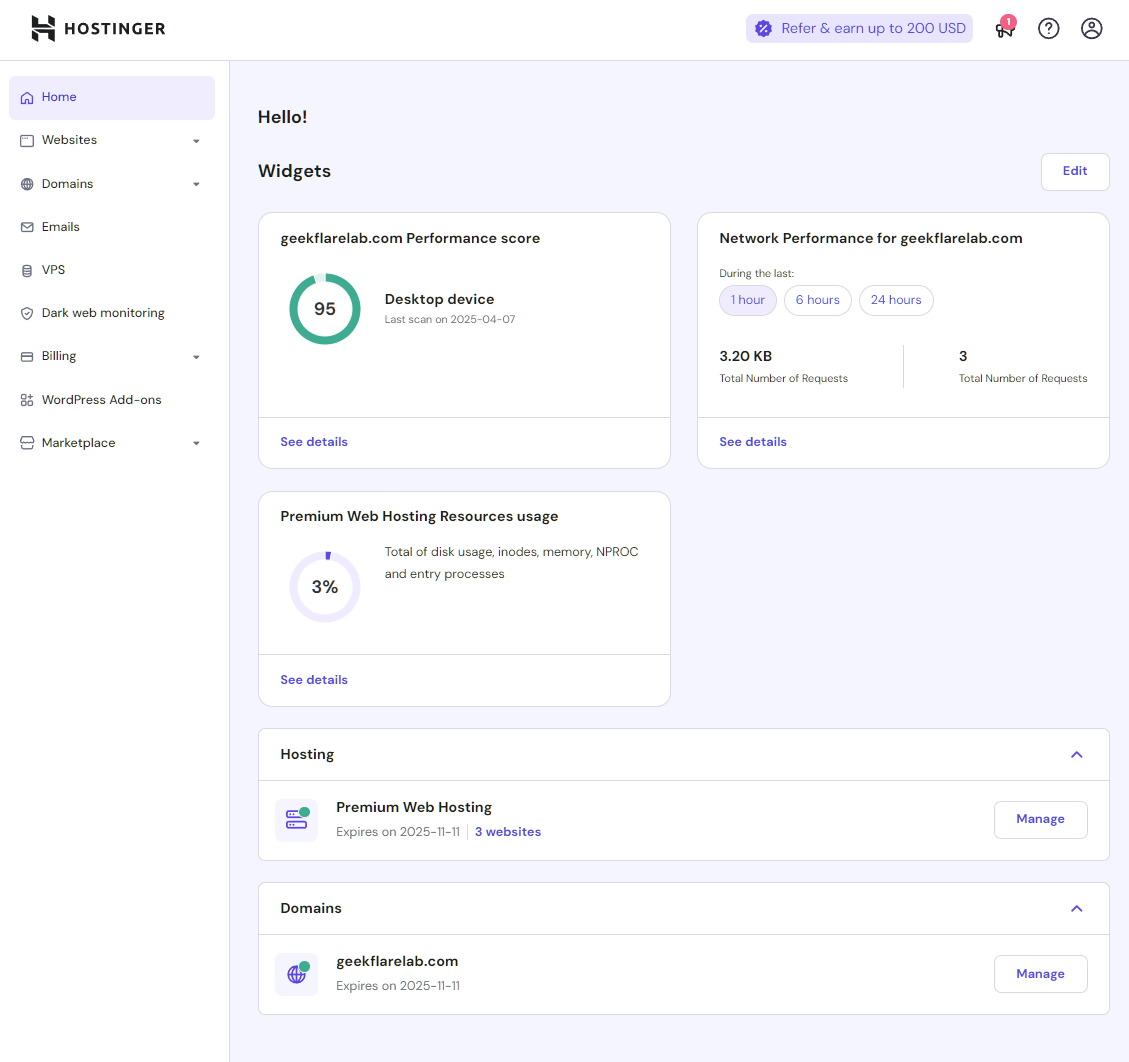
The side menu is populated with important links to websites, domains, VPS hosting, emails, billing, marketplace, and dark web monitoring.
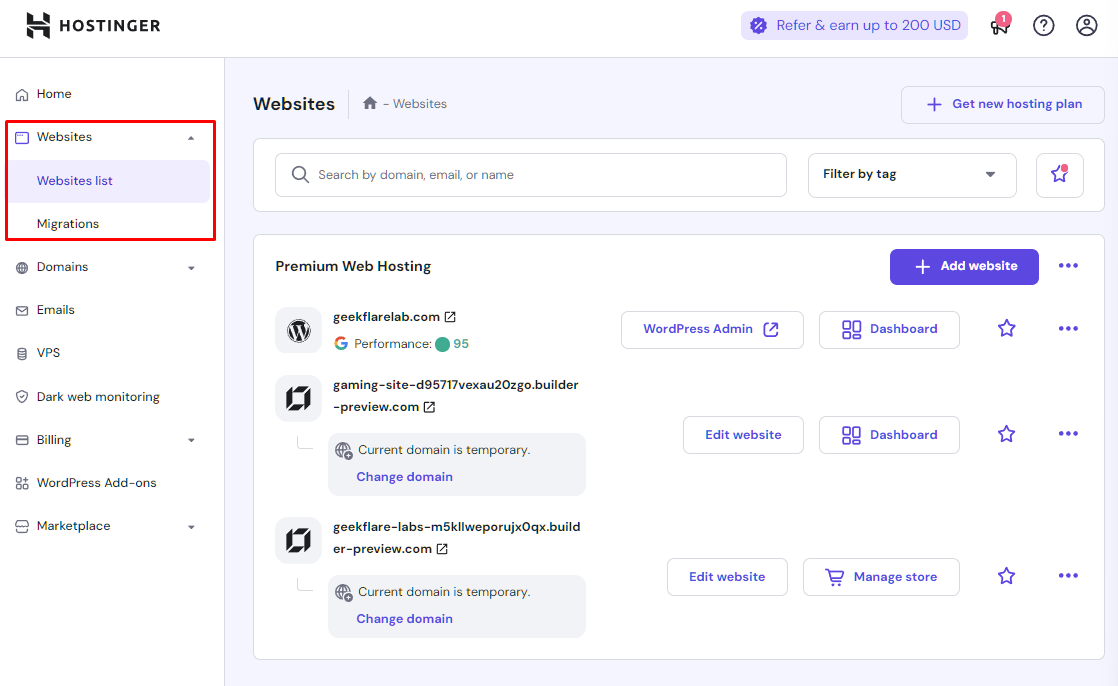
Under Websites, you get the list of the sites you have. From there, you can quickly go to their dashboard, edit websites, or delete them. This is also where you can request migrations.
I found Hostinger’s marketplace listing useful as well. This is where you can get access to all the add‑ons (free and paid), along with WordPress add‑ons.
It comes packed with tons of features, including:
- Easy site migration
- App installation
- Website management
- Checking databases
- Identifying security issues
- Email management
- Widgets
Under the managed plan, you get more options, including security, databases, and WordPress‑related tools tailored for day‑to‑day site maintenance.
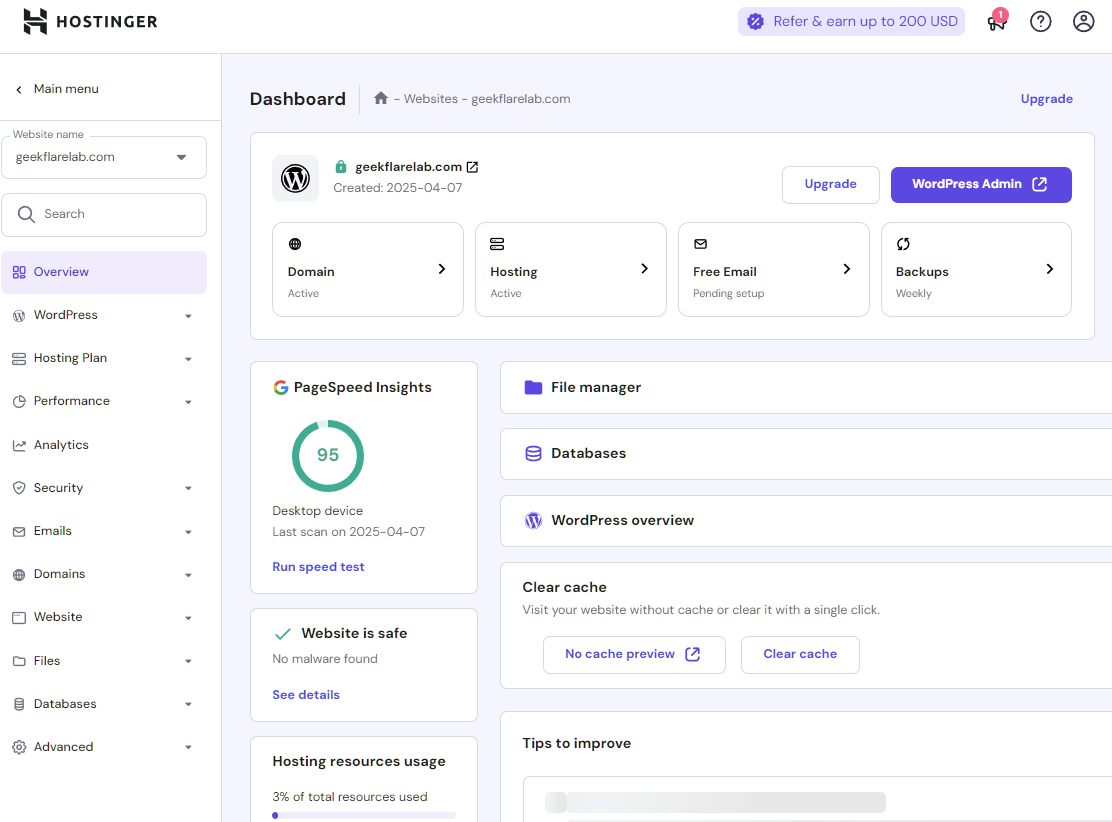
For WordPress sites, you get to manage their core, site speed, security, and staging from one centralized place.
For example, you can force HTTPS, turn LiteSpeed on/off, put the site into Maintenance mode, or change how WordPress updates are pushed.
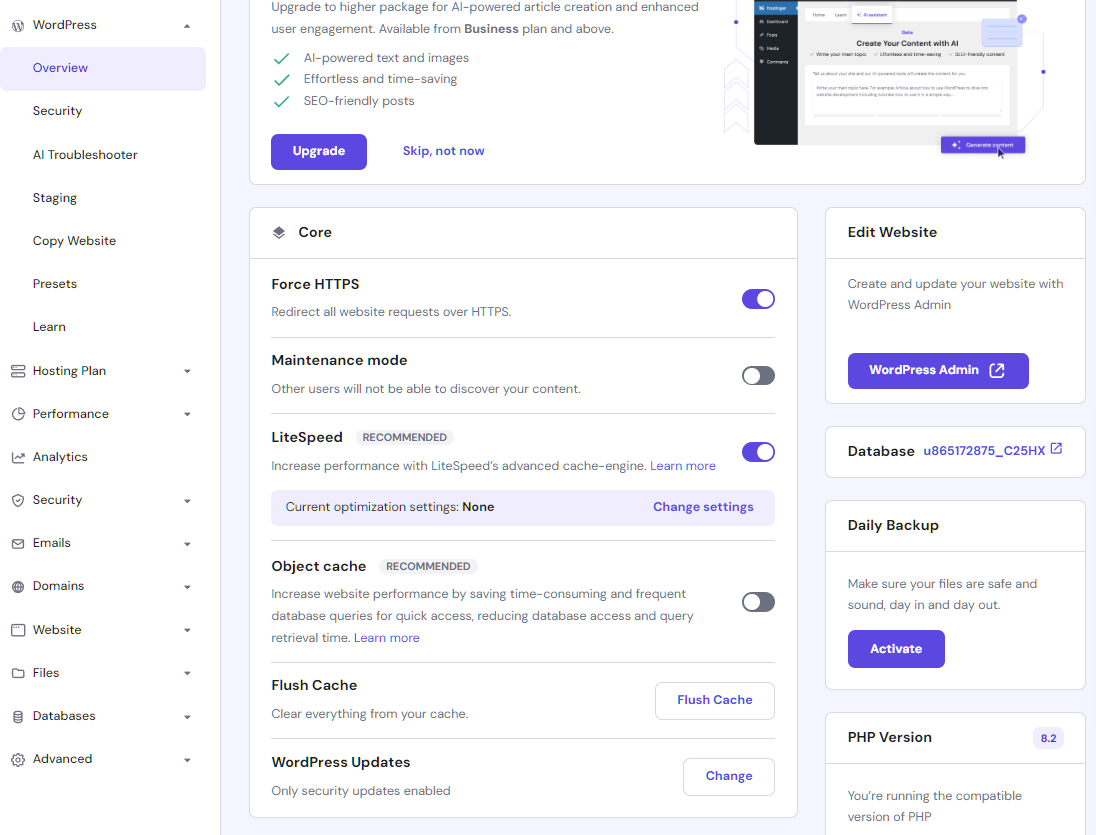
I found the AI Troubleshooter a good addition. It uses AI to help you fix any issues with your site. It is proactive and lets you know if anything goes wrong. In my case, I didn’t get the chance to use it because everything worked smoothly, but it’s reassuring to have automated diagnostics available.
6. Developer-Friendly
For developers, Hostinger offers the ability to create staging environments (available on Business or above plans).
If you’re looking for performance options, the Hostinger custom hPanel gives you the ability to tweak object cache, test page speed, and manage the CDN.
Additionally, you get GIT/SSH access, WP‑CLI tools, unlimited FTP accounts, and unlimited cron jobs to carry out tasks as you need. These features make it easier to automate deployments, run scheduled tasks, and manage complex WordPress installs.
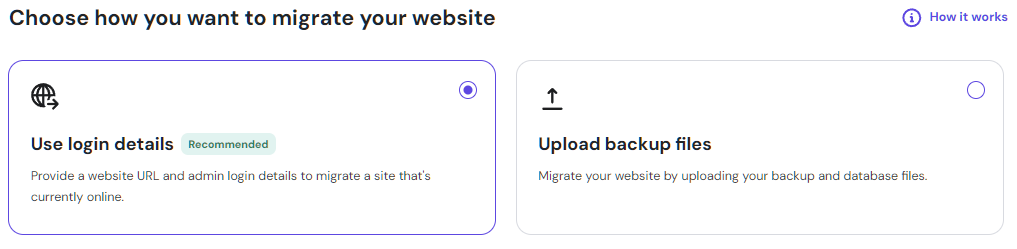
I found its automatic website migration tools handy. All you need to do is provide the site’s URL and login details. It’ll take care of everything else. For more sophisticated sites or offline sites, it offers the option to upload backup files.
How Much Does Hostinger Hosting Cost?
Hostinger Managed WordPress hosting starts at just $2.99 per month (48‑month plan). It is feature‑loaded and gives access to 25K visits monthly, 25 GB SSD storage, and a free domain.
The table below compares the Hostinger WordPress plans.
PlanNo. of websitesMonthly visitsSSD storagePHP workersFree CDNObject-cacheAI Features
Premium2525K25 GB40❌❌❌
Business50100K50 GB60✅✅✅
Cloud Startup100200K100 GB100✅✅✅
Cloud Professional200300K200 GB200✅✅✅
All plans come with a 30‑day money‑back guarantee and 24/7 customer support. If you plan to stay long‑term, the 48‑month commitment gives the best effective monthly pricing.
Which Hostinger Hosting Plan Should I Use?
Hostinger offers four different managed WordPress hosting plans. That’s great because every business or user is different, and a single plan won’t suit everyone’s needs.
That’s why I recommend the following:
- Choose Premium if you’re a newbie, as it is affordable and provides enough features to get your site up and running. It’s great for personal blogs and small portfolio sites that don’t expect heavy traffic.
- Choose Business if you’re a small business that has a site with up to 100K monthly visitors. It comes with AI features and free business email, making it a solid all‑rounder for growing brands.
- Choose Cloud Startup or Cloud Professional if you’re looking to host a WooCommerce or WordPress site with high traffic. These plans are a great pick for scaling projects that need more consistent resources and better performance isolation.
Does Hosting offer VPS or a Cloud Server?
Hostinger offers both VPS (starting at $4.99 per month) and Cloud hosting ($7.99 per month) services.
All VPS and cloud servers support Linux operating systems, and you can choose pre‑existing Linux templates such as Ubuntu, Debian, Rocky Linux, and others.
VPS hosting uses state‑of‑the‑art infrastructure, including NVMe storage, AMD EPYC processors, and a 300 Mb/s network. It gives you exclusive access to your allocated resources, which is ideal for custom stacks or heavier workloads.
However, if you’re looking for more flexibility and scalability, Cloud hosting plans by Hostinger are a better pick. They’re great for a global presence and come with a dedicated IP, malware scanner, unlimited SSL, and much more, making them suitable for mission‑critical sites.
How is Hostinger Support?
Hostinger provides solid customer support available 24/7. It’s available via email, ticket system, and live chat. They do not offer phone support.
What’s best about Hostinger is its new AI‑powered Kodee assistant. It can answer general queries and solve most common issues. For example, I learned about the key difference between Standard and Enhanced DDoS protection, and it answered in a detailed and clear way.
However, it is very difficult to get access to human live support, even when asked for. Kodee tries hard to solve your problem first. After multiple requests, it did connect me with human customer support.

During testing, I found their customer support to be responsive, professional, and knowledgeable.
This matches the Trustpilot rating, which sits at 4.7 out of 5 with 43,422 reviews.
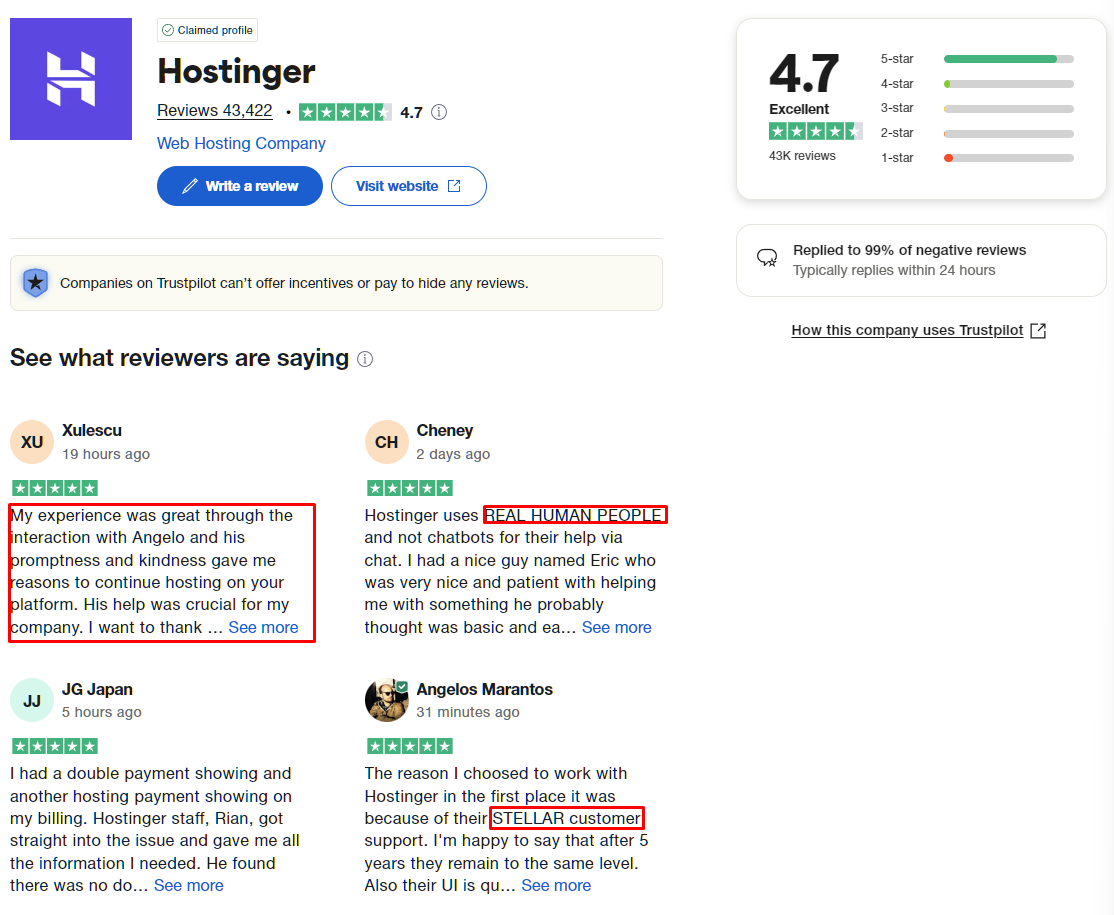
Hostinger Customer Support review on Trustpilot
I also found Hostinger’s knowledge base very useful, as it covers over 1,250+ articles covering every aspect of Hostinger, including PHP, WordPress, cPanel, Email, DNS, and more. For many routine tasks, you’ll likely find step‑by‑step tutorials without needing to contact support.
Hostinger Ratings and Recognitions
Hostinger is a reputable hosting provider, and this is reflected through its online ratings and recognitions as below:
- Geekflare: 4.5 out of 5
- G2: 4.4 out of 5 (700+ reviews)
- Capterra: 4.5 out of 5 (300+ reviews)
- Trustpilot: 4.7 out of 5 (43,400+ reviews)
These consistent scores across independent platforms indicate strong customer satisfaction over time.
Hostinger Alternatives
As a business, you have multiple options when it comes to Hostinger alternatives, including:
- Bluehost: An affordable and feature‑rich WordPress hosting provider that offers 1‑click install, free domain, and 24/7 customer support.
- IONOS: A fast WP hosting provider with a 99.99% uptime guarantee and an excellent AI website builder.
- SiteGround: Ideal pick for sites with high traffic, powered by Google Cloud Platform, available at an affordable rate as well.
- hosting.com: Get an out‑of‑the‑box optimized WordPress experience by choosing from its cloud, dedicated, or shared hosting options.
The table below compares the Hostinger alternatives:
ProductPrice per monthFree SSLWebsite BuilderDaily Backups
Hostinger$2.99✅✅✅ (not on basic plan)
Bluehost$3✅✅✅ (not on basic plan)
IONOS$1✅✅✅ (not on basic plans)
SiteGround$2.99✅❌✅
hosting.com$2.99✅❌✅
This comparison shows that Hostinger stays competitive on pricing while bundling a website builder and backups on most plans.
Who Should Use Hostinger?
I recommend Hostinger to anyone looking for an affordable WordPress host that offers a website builder. This can include:
- Individuals
- Startups
- Small businesses
- Web developers
Hostinger is also a good choice for newbies looking to host their portfolio or personal website, especially if they want an easy setup and bundled tools like email and SSL.
Who Shouldn’t Use Hostinger?
As Hostinger’s standard WordPress offering uses a shared server, it is not ideal for:
- Businesses that need enterprise‑level hosting.
- Websites with very high traffic (more than 2M visitors monthly).
- Projects that need dedicated hosting resources to perform smoothly.
- Users looking specifically for the classic cPanel interface rather than hPanel.
I don’t recommend Hostinger’s shared WordPress plans for large‑scale eCommerce hosting due to the inherent limitations of shared infrastructure.
Hostinger Verdict
Hostinger passes all the checks that a business needs to host its WordPress site reliably and securely – without compromising performance or affordability.
As Hostinger is focused on affordability, they provide shared resources. This makes it ideal for small businesses, newbies hosting their portfolios, or startups just starting their online journey.
All this is backed by WordPress.org, which recommends Hostinger.
In my review, I found some key features that make Hostinger shine, including its user‑friendly custom hPanel, AI‑powered Kodee assistant, and website builder.
Performance‑wise, Hostinger does well for shared hosting. It can load sites fast (well within 2‑second load times) thanks to WordPress‑optimized performance features such as the LiteSpeed caching plugin, object caching, free CDN, and strategically placed servers across the globe.
All of these mean Hostinger receives the Geekflare Value Award, thanks to its affordability, ease of use, refined AI site builder, developer‑friendly tools, and generous free extras.
Frequently Asked Questions (FAQs)
Can I Host WooCommerce on Hostinger?
Yes. You can host WooCommerce stores on Hostinger, especially on the Business and Cloud plans, which offer more resources and better performance for transaction‑heavy sites.
Can I use Hostinger for Business email?
Yes. Hostinger includes free domain‑based business email accounts on many plans, allowing you to create professional addresses like [email protected] without paying for a separate email service.