F-Secure ranks among the best antivirus programs available today, consistently earning top marks from independent testing organizations like AV-TEST and AV-Comparatives while performing exceptionally well in our in-house testing. We appreciate its continuously updated threat database, which ensures round-the-clock protection against the latest malware and phishing attacks. However, it does have some notable protection gaps, and surprisingly, given its premium price point, it lacks a proprietary firewall—a feature commonly found in competing products.
In this comprehensive review, we’ll examine our hands-on testing experience with F-Secure, explore its extensive feature set, analyze subscription plans, and help you determine if it’s the right choice for your cybersecurity needs.
Quick Navigation
Pros and Cons
Pros
✓ Comprehensive protection against malware, phishing, ransomware, and other cyberthreats with consistently high detection rates
✓ Perfect scores in all in-house and third-party tests, demonstrating exceptional security capabilities
✓ Total plan includes unlimited VPN, password manager, identity monitoring, and additional security tools in one comprehensive package
✓ User-friendly interface with intuitive navigation that makes security management accessible to non-technical users
✓ 30-day free trial with no credit card required, allowing thorough testing before purchase commitment
Cons
✗ Expensive compared to competitors like TotalAV ($19/year) and Norton ($29.99/year), with starting price of $49.99/year
✗ No proprietary firewall included, relying instead on operating system’s built-in firewall functionality
✗ macOS version has limited scan options with only one scan type available
✗ Performance impact on macOS systems significantly exceeds industry averages
Quick Overview
| Feature | Details |
|---|---|
| Starting Price | $49.99/year |
| Free Trial | 30 days (no credit card required) |
| Devices Protected | 1-25 |
| Malware Scans | Manual and scheduled scans |
| Real-Time Protection | Yes |
| EICAR Test Results | 3/3 (Perfect Score) |
| Firewall | No (uses OS firewall) |
| Phishing Protection | Yes |
| Compatibility | Windows, macOS, Android, iOS |
| Bonus Features | VPN, password manager, identity monitoring |
| Customer Support | 24/7 live chat, phone support (business hours) |
Try F-Secure Free for 30 Days →
Our Testing Experience
We tested F-Secure Total on a MacBook running macOS Tahoe to evaluate its real-world performance, ease of use, and effectiveness in protecting against various cyberthreats.
Installation and Setup
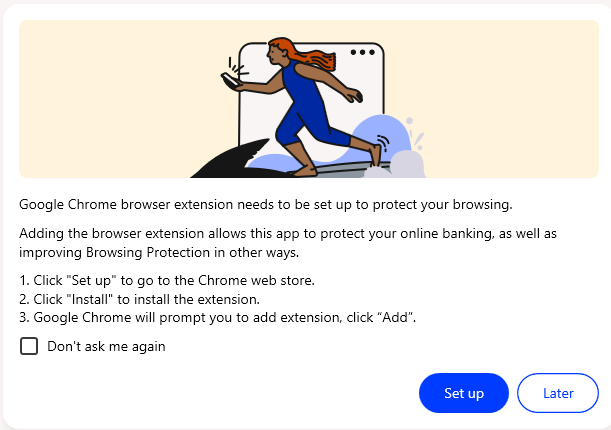
The download and installation process was remarkably smooth, with all critical settings automatically enabled upon installation and requiring minimal manual configuration. The only manual setup required was configuring the Browsing Protection browser extension, which was straightforward as the task appeared directly in our to-do list, making it easy to locate the extension link and dismiss tasks for browsers we don’t use.
Scan Performance
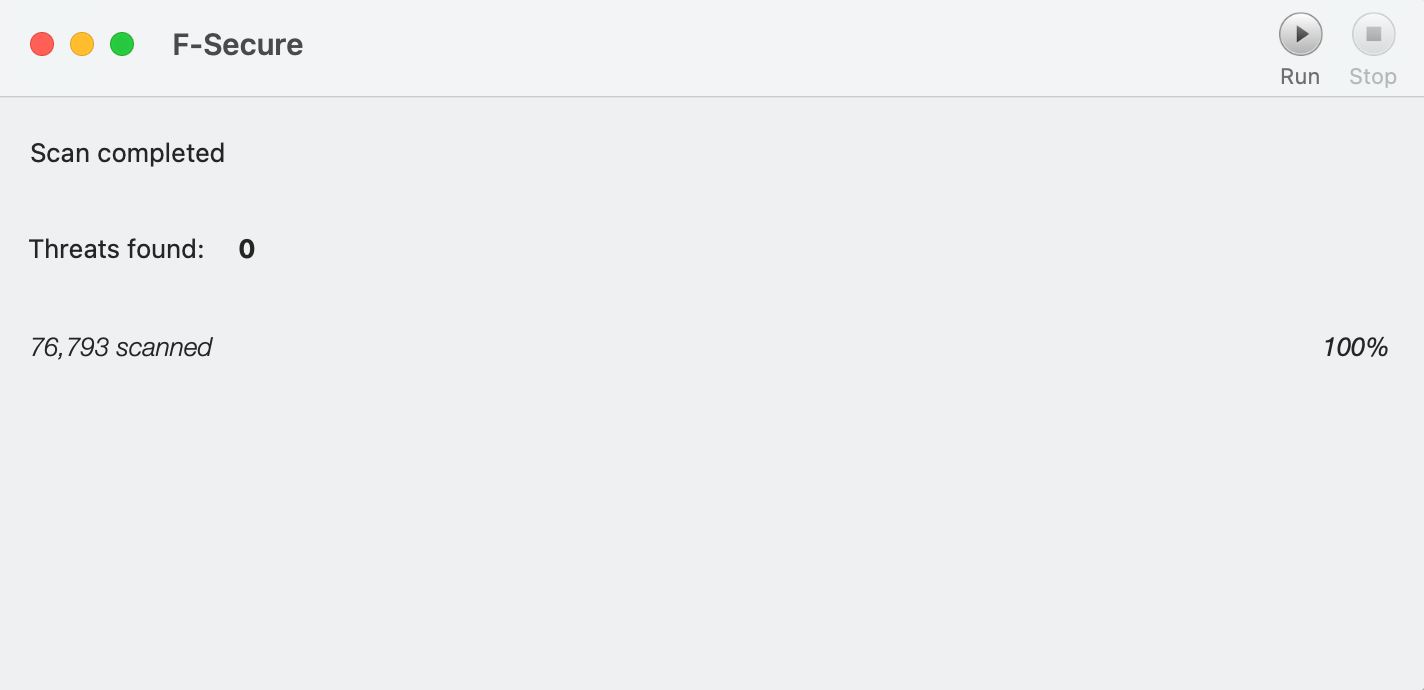
After completing setup, we navigated to the Device Protection tab to run scans and discovered that the macOS version offers only one scan type: Virus and spyware scan, which scans the most vulnerable files rather than providing comprehensive system coverage.
Our scan results:
- Scan time: Approximately 1 minute
- Files scanned: 76,793
- Threats detected: 0 (failed to detect pre-installed malware dummy files)
The scan was impressively fast, completing in just about one minute, but it failed to detect the malware dummy files we had downloaded before installing F-Secure. Additionally, there was no full scan option available to test whether F-Secure could locate these files with a more comprehensive scan, which was disappointing given the premium price point.
Note: We’ve previously tested the Windows version, which includes more comprehensive scan options and performed better in our tests, so this limitation appears specific to the macOS program.
User Interface
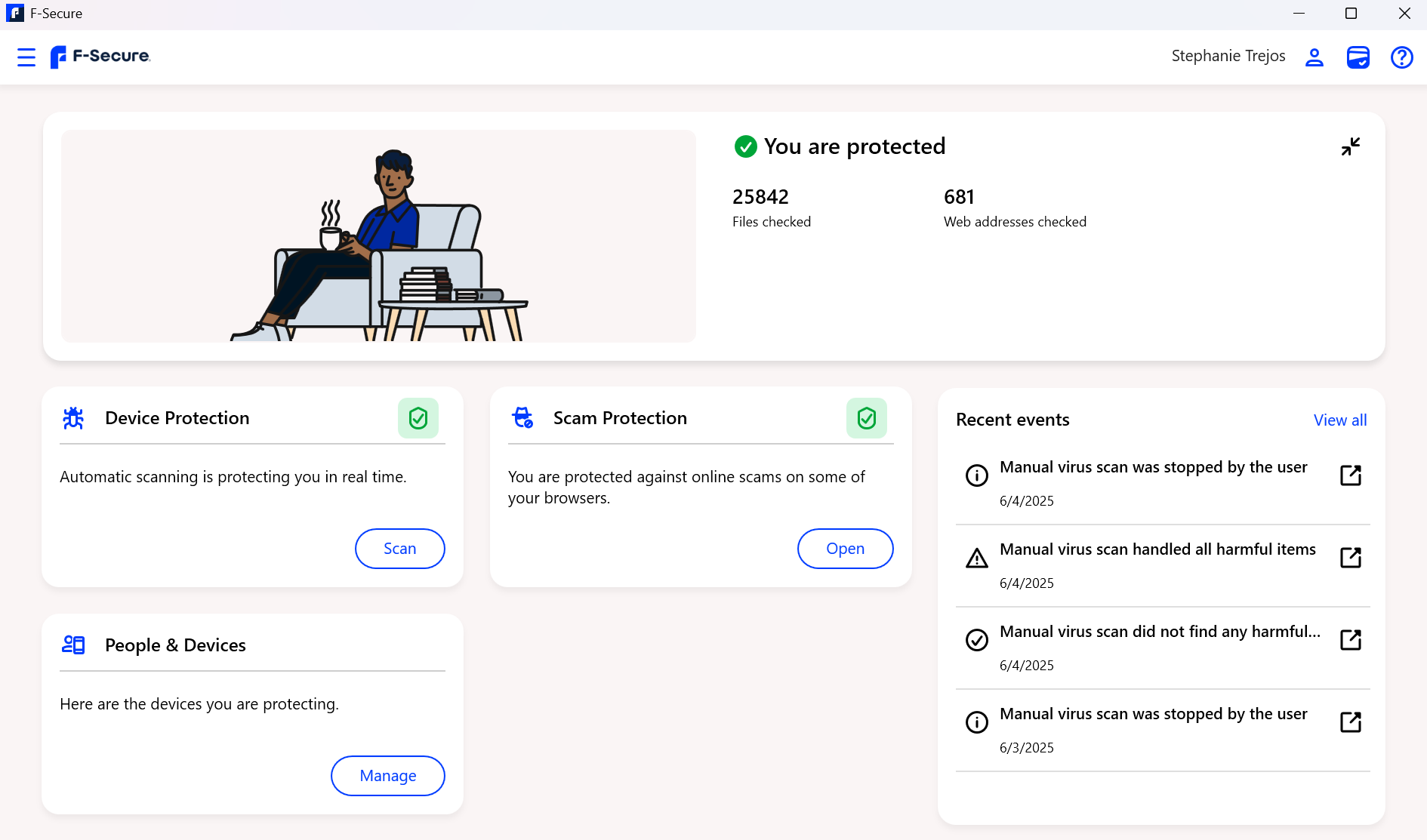
Overall, we found F-Secure to have an intuitive and user-friendly interface with a clean and well-organized dashboard that makes it easy to navigate between different features. The interface is ideal for users seeking easy-to-use antivirus software with comprehensive features, as the main sections are clearly labeled and accessible:
- Device Protection: Manage scans and view threat history
- Privacy VPN: Connect to secure servers worldwide
- Password Vault: Store and manage passwords
- Identity Monitoring: Monitor for data breaches
Who Should Choose F-Secure?
F-Secure is ideal for users who need comprehensive, high-performing protection and aren’t constrained by budget considerations, particularly those who value top-tier security with additional privacy features.
Best For:
Windows Users
F-Secure performs best on Windows systems, offering multiple scan types and minimal performance impact with perfect 18/18 scores from AV-TEST. Windows users will get the most comprehensive protection with access to all scanning options and features without the performance concerns that affect the macOS version.
Families
Parents seeking to ensure their children’s online safety will appreciate F-Secure’s robust parental controls, which allow parents to filter unwanted content, block inappropriate websites and apps on compatible devices, and set screen time limits to manage digital consumption effectively.
Gamers
Gamers will value F-Secure’s Gaming Mode feature, which prevents interruptions during gameplay, reduces system resource usage, pauses scheduled scans automatically, and provides an optimized gaming experience without compromising security.
Privacy-Conscious Users
F-Secure Total includes comprehensive privacy features such as unlimited VPN with kill switch, password manager with secure vault, dark web monitoring for personal information, and identity theft protection that provides peace of mind.
Not Ideal For:
Budget-Conscious Users
F-Secure’s high starting price ($49.99/year) may be prohibitive for users seeking affordable protection, especially when competitors like TotalAV ($19/year) and Norton ($29.99/year) offer similar protection levels at significantly lower costs.
macOS Users Seeking Comprehensive Scans
The macOS version has limited scan options with only one scan type available and showed significant performance impact in testing, with 67% average influence on software launch speeds compared to the 14% industry average.
Pricing and Subscription Plans
F-Secure offers two main plan types with flexible device coverage options, allowing users to customize their protection based on the number of devices they need to secure.
Plan Comparison
| Feature | Internet Security | Total |
|---|---|---|
| Starting Price | $49.99/year | $69.99/year |
| Devices Supported | 1-25 | 1-25 |
| Contract Length | 1 or 2 years | 1 or 2 years |
| Free Trial | 30 days | 30 days |
| Malware Protection | ✓ | ✓ |
| Phishing Protection | ✓ | ✓ |
| Real-Time Protection | ✓ | ✓ |
| Ransomware Protection | ✓ | ✓ |
| Parental Controls | ✓ | ✓ |
| Banking Protection | ✓ | ✓ |
| Gaming Mode | ✓ | ✓ |
| VPN (Unlimited) | ✗ | ✓ |
| Password Manager | ✗ | ✓ |
| Identity Monitoring | ✗ | ✓ |
| Dark Web Monitoring | ✗ | ✓ |
Price Comparison with Competitors
F-Secure’s starting cost is significantly higher compared to other antivirus programs in the market, which may make it difficult for budget-conscious users to justify the investment:
- TotalAV Antivirus Pro: $19.00/first year
- Norton Antivirus Plus: $29.99/first year
- McAfee Essential: $39.99/first year
- F-Secure Internet Security: $49.99/year
While F-Secure is a high performer with excellent test scores and comprehensive features, the premium price may be difficult to justify when many competitors offer similar protection at significantly lower costs.
Our Recommendation
We recommend F-Secure Total for most users despite the higher price ($69.99/year vs. $49.99/year) because the additional features provide excellent value when considered as a bundle. The Total plan effectively combines three separate services into one comprehensive package:
- Unlimited VPN: Worth $50-100/year alone when purchased separately
- Password Manager: Eliminates need for separate subscription ($30-50/year)
- Identity Monitoring: Provides peace of mind and early breach detection
This makes the Total plan more cost-effective than purchasing these services individually from different providers, and the convenience of having everything in one place adds significant value.
Security Features Deep Dive
F-Secure offers comprehensive protection against a wide range of cyberthreats through multiple layers of security that work together to provide robust defense.
1. Malware and Antivirus Scanning
Scan Types:
- Quick Scan: Scans most vulnerable files in 1-2 minutes
- Full Scan: Comprehensive system scan (Windows only)
- USB Device Scan: Scans external storage devices for threats
- Scheduled Scans: Automatic scans at set times
Key Features:
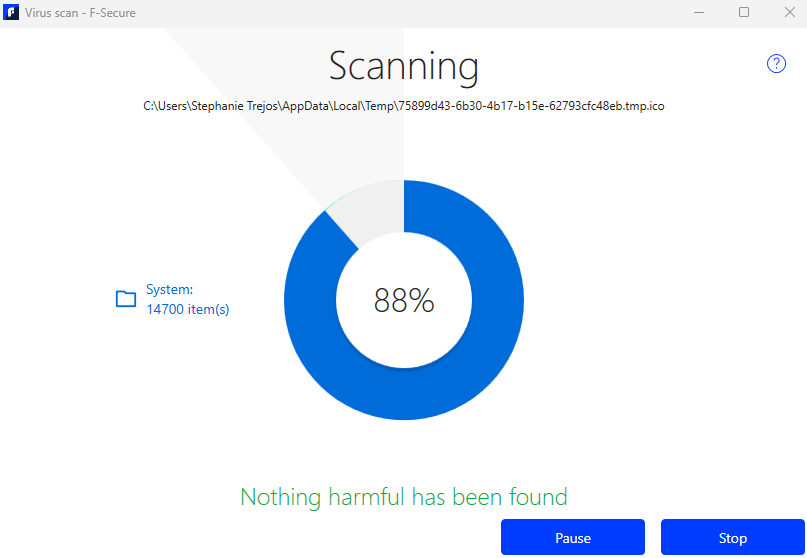
F-Secure’s scanning engine is fast and efficient, providing clear scan results with actionable options for automatic threat removal or quarantine while maintaining minimal system resource usage during scans.
Customization Options:
You can schedule scans directly from the settings, customizing the frequency (daily, weekly, monthly), day of the week, starting time, and scan type to fit your usage patterns.
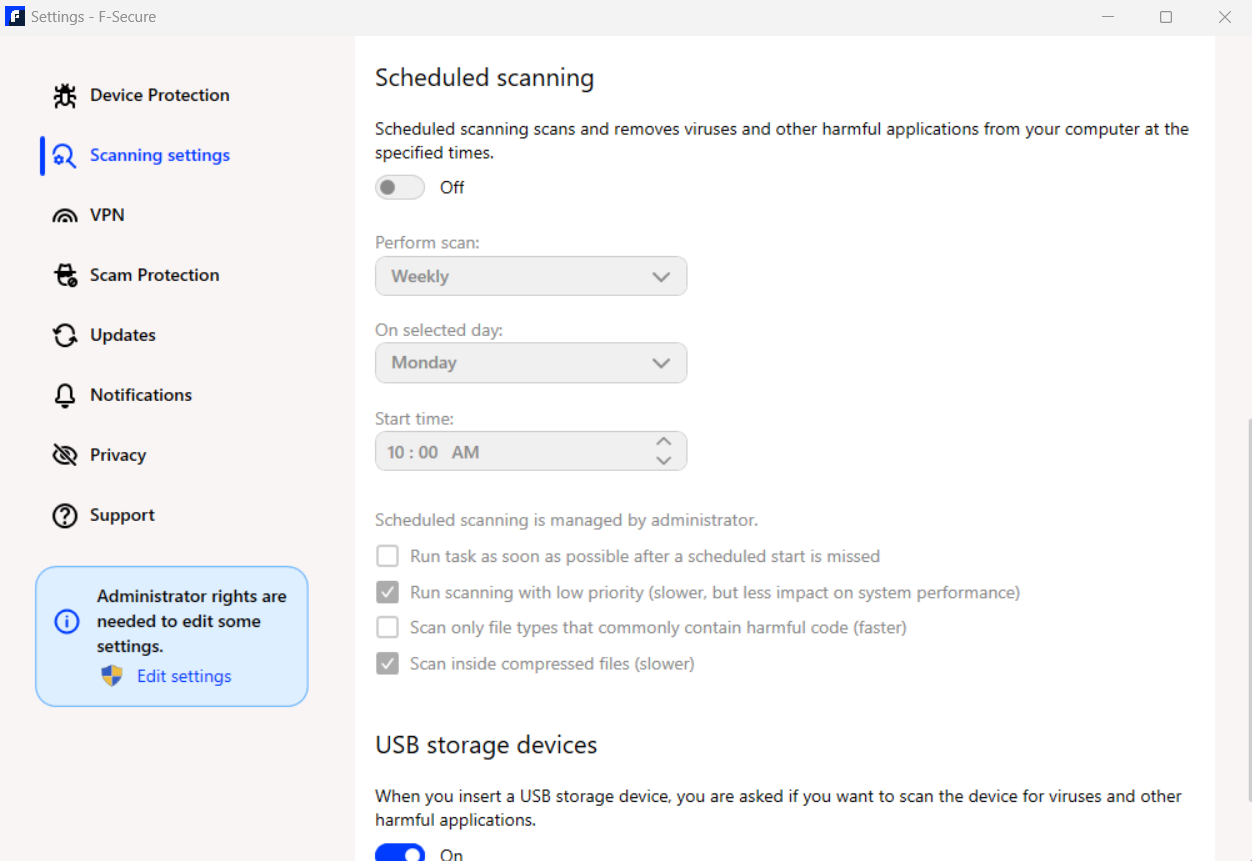
Our Recommendation: Perform full scans periodically rather than relying solely on quick scans, as quick scans may overlook hidden malware on your device that could pose security risks.
2. Real-Time Protection
F-Secure provides continuous, real-time protection through its advanced Security Cloud Technology, which stores malware and cyberthreat data in the cloud with AI-powered threat analysis, machine learning algorithms, and real-time updates from global threat reports.
DeepGuard Technology:
This proprietary feature monitors installed applications continuously, blocks suspicious applications from accessing the internet, prevents unauthorized system changes, and detects zero-day threats and exploits before they can cause damage.
Protection Coverage:
Real-time protection extends to web browsing, email attachments, downloaded files, application installations, and system modifications, ensuring comprehensive coverage across all potential attack vectors.
3. Ransomware Protection
F-Secure’s multi-layered ransomware protection includes folder monitoring that watches important folders for suspicious activity and blocks unauthorized file encryption attempts to protect documents, photos, and personal files.
Behavioral Analysis:
The system detects ransomware-like behavior patterns, blocks suspicious file modifications, and prevents data encryption by unknown applications before they can lock your files.
Network Protection:
F-Secure blocks communication with known ransomware servers, prevents remote access by malicious actors, and stops botnet-driven DDoS attacks that could compromise your system.
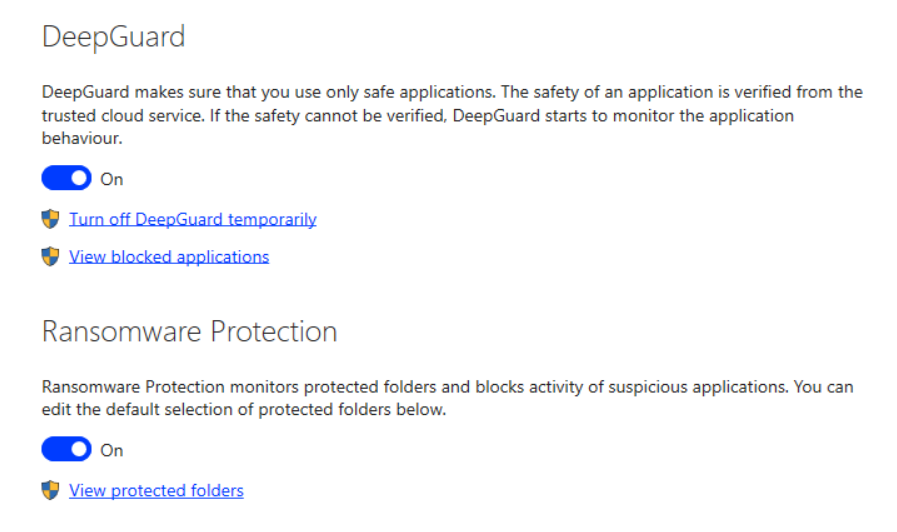
4. Phishing and Web Protection
F-Secure includes multiple secure browsing features enabled by default to protect you from online threats:
Browsing Protection:
This feature blocks access to harmful websites through real-time URL scanning, provides protection against drive-by downloads, and maintains a constantly updated malicious website database.
Banking Protection:
F-Secure’s Banking Protection activates automatically on banking websites, launching a secured browser for financial transactions that isolates banking sessions from other activities, blocks session interception attempts, and clears clipboard data after banking sessions are completed.
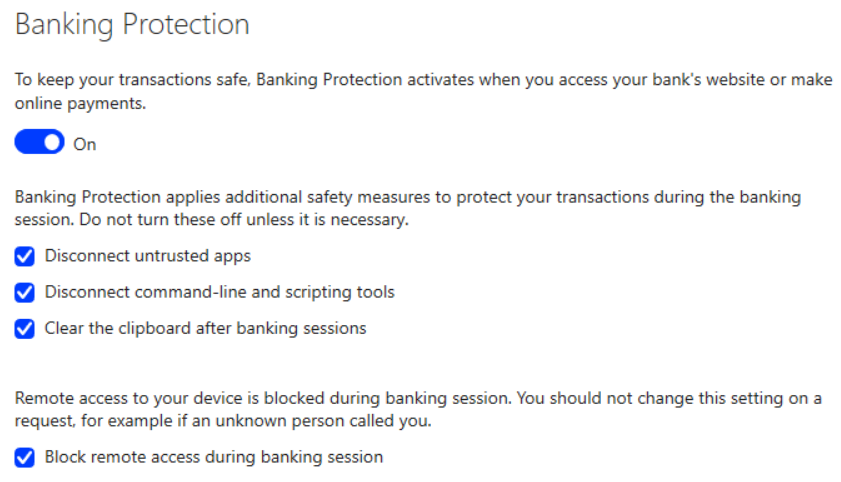
Trusted Shopping:
This feature notifies you of fake or untrustworthy shopping sites, verifies website authenticity, protects payment information, and warns about suspicious online stores before you enter sensitive data.
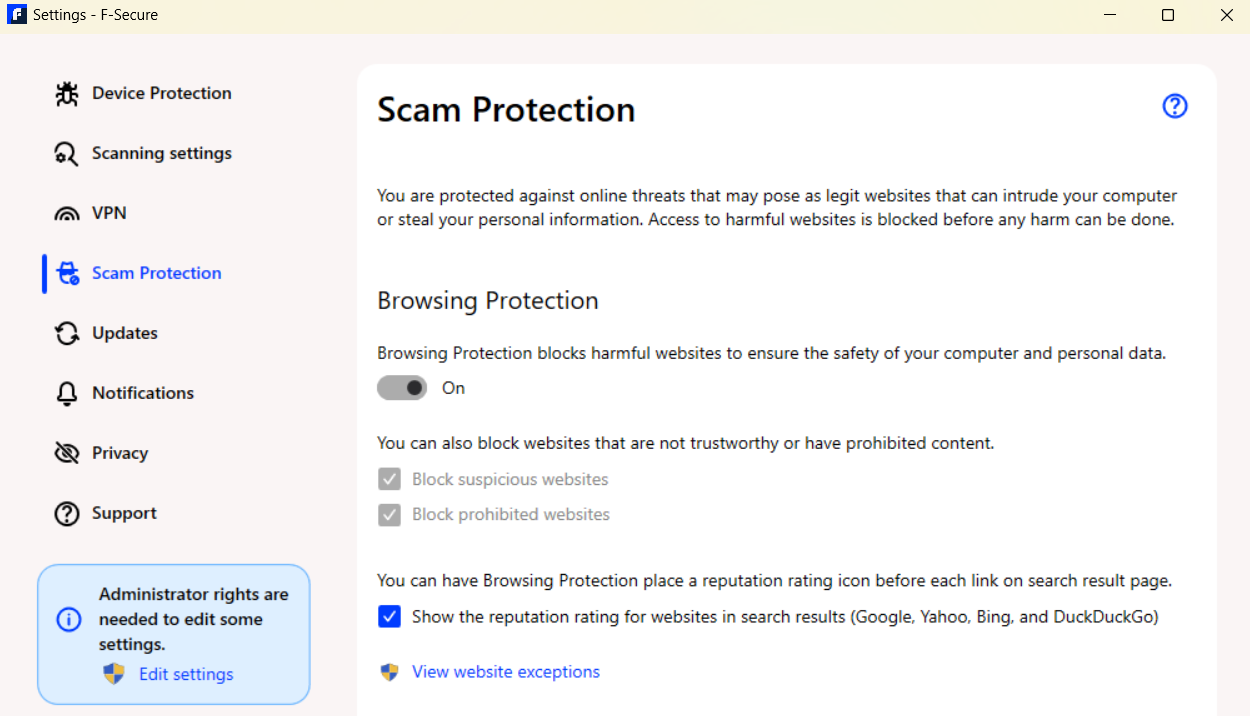
Browser Extension:
The Browsing Protection extension (available for Chrome, Firefox, and Edge) provides real-time website safety warnings, ad blocking capabilities, tracking prevention, and phishing site detection.
5. Firewall Protection
Important Note: F-Secure doesn’t include a proprietary firewall but instead integrates with your operating system’s built-in firewall, which works seamlessly with Windows Defender Firewall to monitor incoming and outgoing traffic, allows configuration of IP and port blocking, and provides pop-up alerts for suspicious activity.
Advantages:
This approach eliminates conflicts with OS firewall, reduces system resource usage, and provides a familiar interface for advanced users who are already comfortable with their operating system’s security tools.
Disadvantages:
However, this means less control than dedicated firewall solutions, reliance on OS firewall quality, and potentially lacking advanced features found in premium firewalls offered by competitors.
6. Privacy Features (Total Plan Only)
Privacy VPN:
F-Secure’s VPN offers unlimited bandwidth, servers in 28+ countries, a strict no-logs policy, kill switch protection, automatic Wi-Fi protection, and tracking prevention to keep your online activities private.
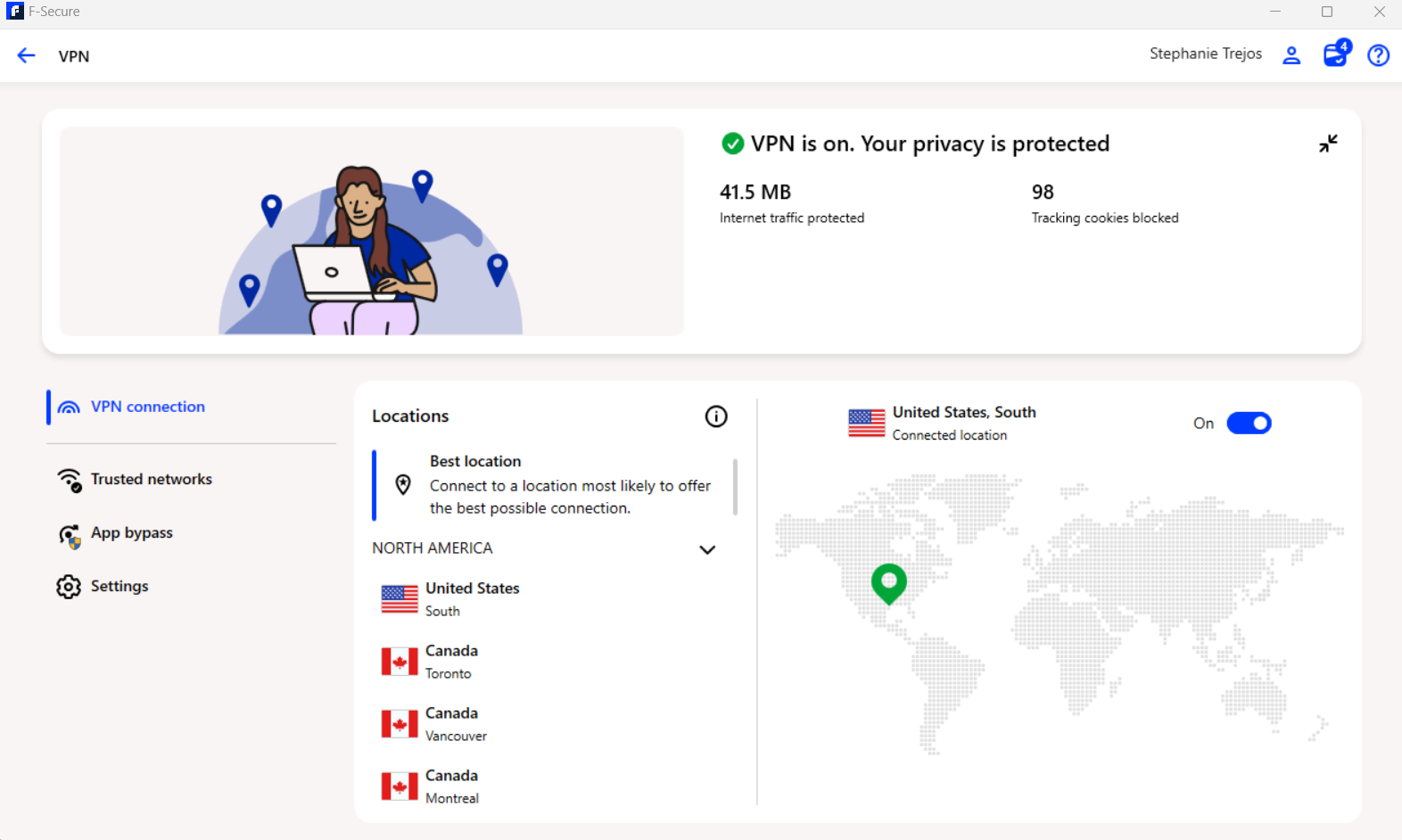
Password Vault:
The password manager provides unlimited password storage, a strong password generator, auto-fill capabilities, secure notes storage, cross-device synchronization, and biometric authentication support for convenient yet secure access.
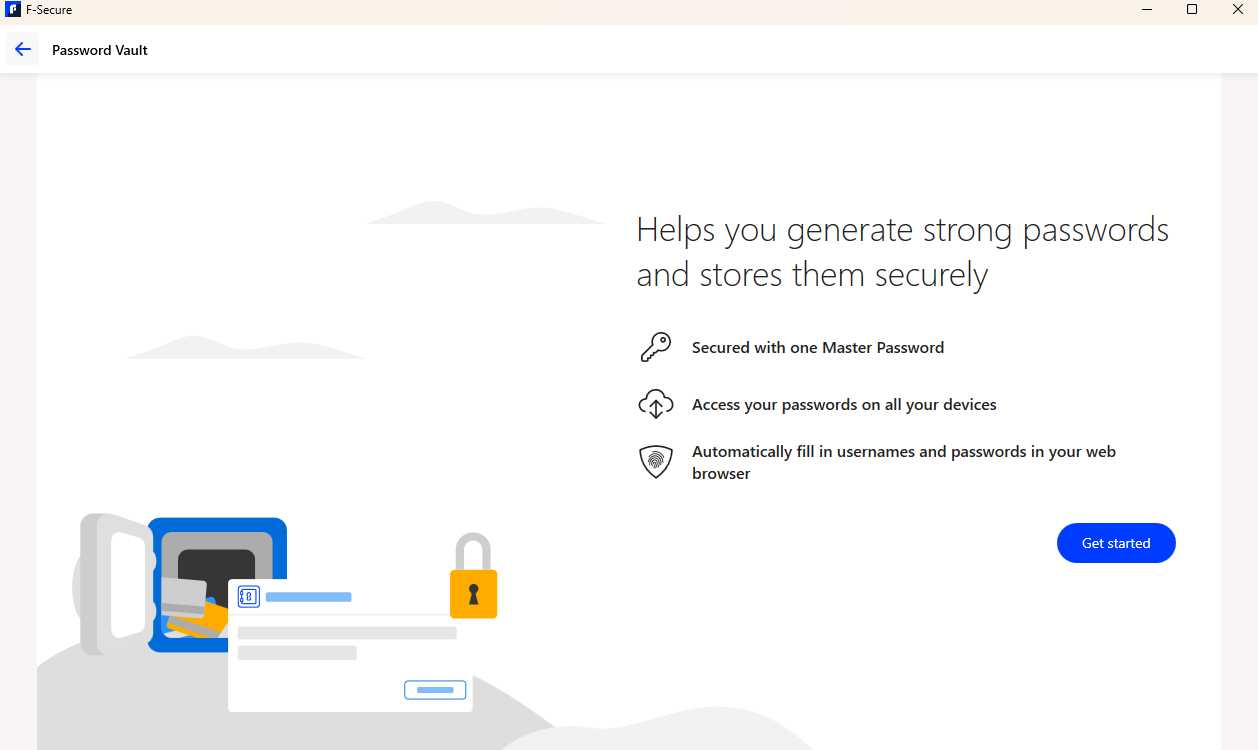
Identity Monitoring:
F-Secure monitors the dark web for your email addresses, Social Security numbers, driver’s license numbers, credit card information, and bank account details, providing real-time breach alerts, comprehensive breach reports, and actionable security recommendations.
Explore F-Secure Total Features →
Test Results and Performance
We subjected F-Secure to rigorous testing across three categories: scan efficiency, EICAR tests, and third-party evaluations to provide a comprehensive assessment of its capabilities.
Our In-House Testing
Scan Efficiency Test
Methodology: We downloaded several malware dummy files and distributed them across our laptop before installing F-Secure, then ran the Virus and spyware scan to determine detection capability.
Results:
| Metric | Result |
|---|---|
| Scan Type | Virus and spyware scan (macOS) |
| Time Spent | 1 minute |
| Files Scanned | 76,793 |
| EICAR Files Detected | 0 |
| Verdict | Failed to detect pre-installed threats |
Analysis: F-Secure’s quick scan completed in under one minute, which is excellent for speed, but it detected zero threats on our device. The macOS program’s limitation to a single scan type prevented us from testing whether a full scan would have detected these files, which is a significant concern for macOS users.
EICAR Test Results
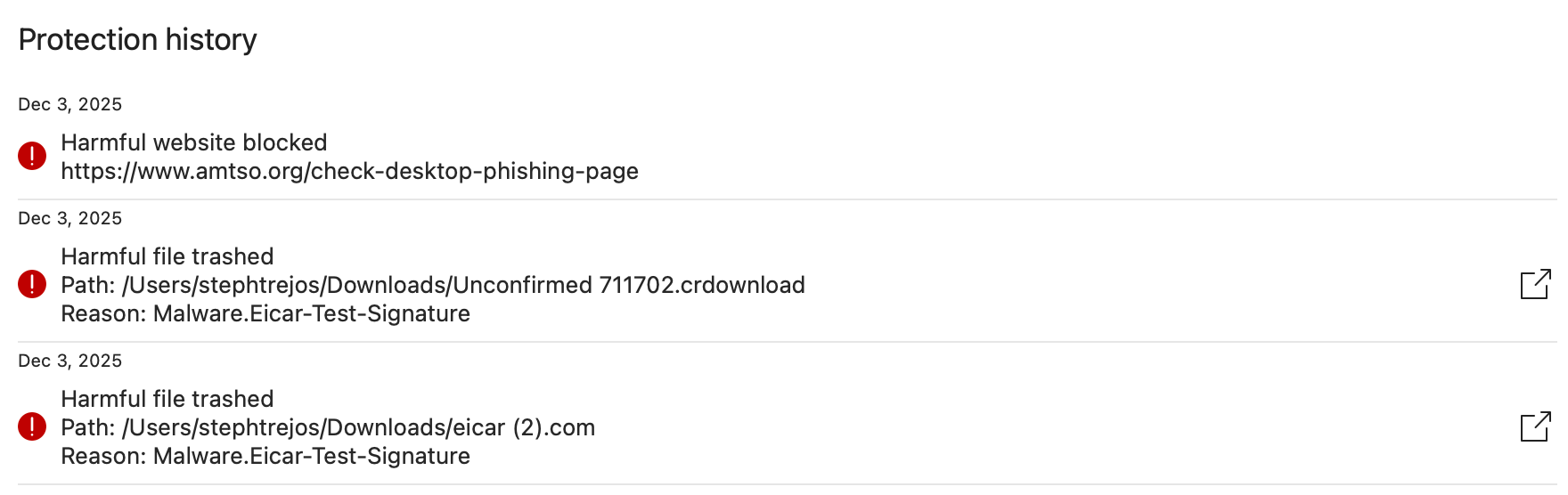
Methodology: We used test files from the European Institute of Computer Antivirus Research (EICAR) to evaluate F-Secure’s ability to detect and block various threat types in real-world scenarios.
Results:
| Test Type | Result | Details |
|---|---|---|
| Malware Detection | ✓ Pass | Successfully blocked EICAR malware test file |
| Drive-by Downloads | ✓ Pass | Prevented automatic malware download |
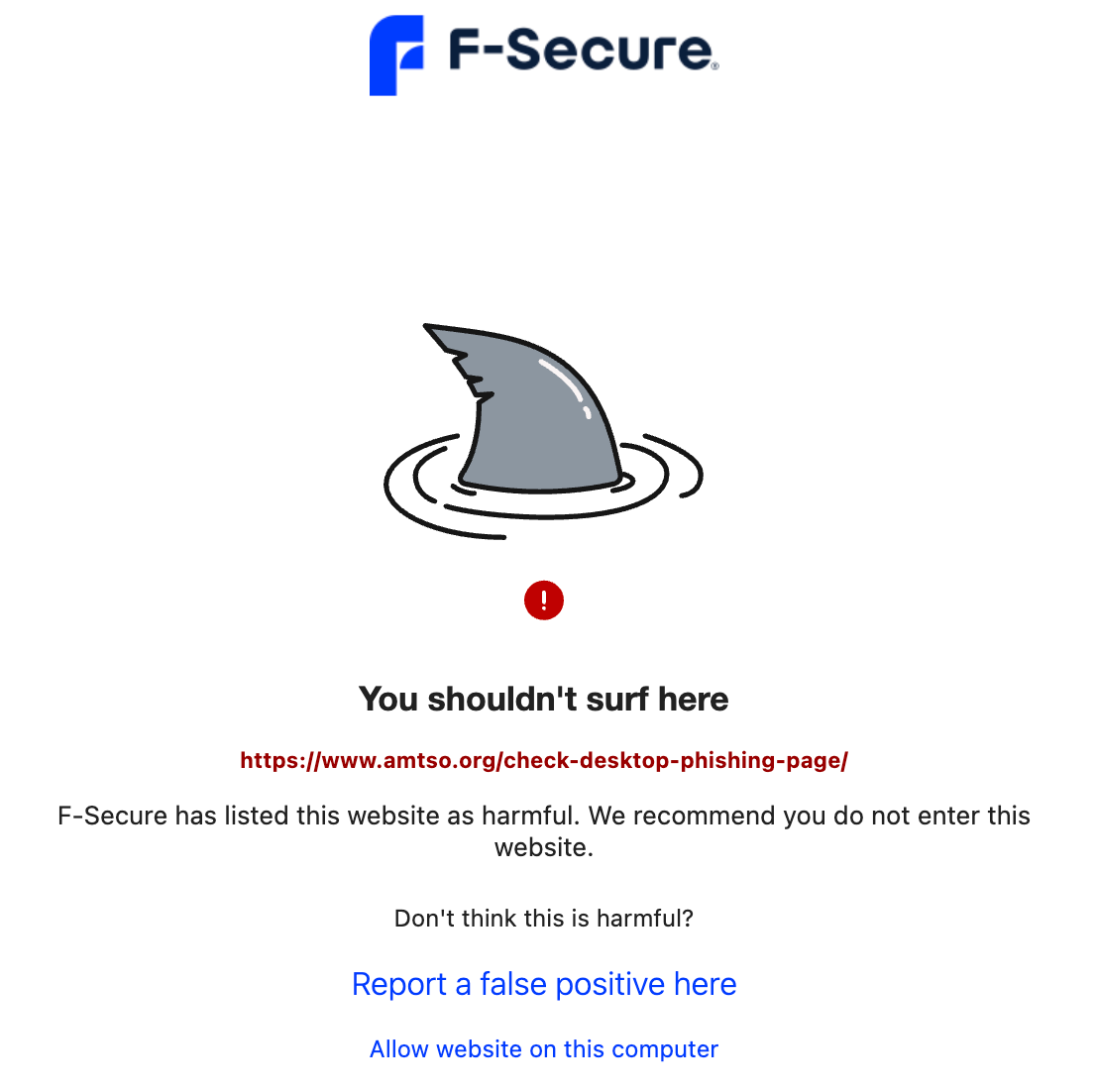
| Phishing Pages | ✓ Pass | Blocked access to phishing test site |
| Overall Score | 3/3 | Perfect Score |
Analysis: F-Secure passed all three EICAR tests with ease, demonstrating strong real-time protection capabilities that effectively blocked phishing attempts through the Browsing Protection feature while the malware scanner caught test files immediately.
Third-Party Testing Results
AV-TEST Results (Most Recent)
AV-TEST is an independent organization that evaluates antivirus software across three criteria: protection, performance, and usability, providing industry-standard benchmarks.
Windows (October 2025):
| Category | Score | Industry Average |
|---|---|---|
| Protection | 6/6 | 5.9/6 |
| Performance | 6/6 | 5.8/6 |
| Usability | 6/6 | 5.9/6 |
| Total | 18/18 | Perfect Score |
macOS (September 2025):
| Category | Score | Industry Average |
|---|---|---|
| Protection | 6/6 | 5.8/6 |
| Performance | 4.5/6 | 5.5/6 |
| Usability | 6/6 | 5.9/6 |
| Total | 16.5/18 | Good Score |
Performance Issues on macOS:
The macOS version showed 67% average influence on software launch speeds (industry average: 14%) and 70% average influence on app installation speeds (industry average: 26%), with the same performance score for three consecutive testing cycles suggesting these issues may not be addressed soon.
Android (September 2025):
| Category | Score |
|---|---|
| Protection | 6/6 |
| Performance | 6/6 |
| Usability | 6/6 |
| Total | 18/18 |
Key Takeaways:
F-Secure achieved perfect scores on Windows and Android platforms, demonstrated excellent protection across all platforms with zero false positives, but macOS performance concerns persist and should be considered by Mac users.
AV-Comparatives Results (2025)
AV-Comparatives conducts comprehensive testing across multiple categories to evaluate real-world performance against actual threats.
Real-World Protection Test (July-October 2025):
F-Secure scored 99.1% and ranked 4th place (tied with Bitdefender and Microsoft Defender), blocking 109 out of 110 threats, though the top score of 100% was achieved by Avast, AVG, and Norton.
Malware Protection Test (September 2025):
F-Secure achieved an impressive 99.99% score, ranking 2nd place (tied with Avira, Bitdefender, Kaspersky, and others) with zero false positives, though the top score was 100%.
Performance Test (September 2025):
F-Secure scored 28.5 (lower is better) and ranked 17th out of 18, showing significant performance impact compared to competitors, with the best score being 3.0 achieved by Kaspersky.
Mobile Security (Android – July 2019):
F-Secure scored 99.9%, though these results are outdated and should be considered with caution.
macOS Security (June 2019):
F-Secure scored 99.8%, though these results are outdated as most vendors focus on Windows testing for their primary submissions.
Key Takeaways:
F-Secure demonstrated excellent malware detection rates and strong real-world protection with zero false positives, but performance impact is higher than competitors, which may affect user experience on some systems.
SE Labs Results (2021 Q4)
SE Labs evaluates protection accuracy against general and targeted attacks, plus legitimate accuracy based on false positives to provide a comprehensive assessment.
Results:
| Category | Score |
|---|---|
| Protection Accuracy | 98% |
| Legitimate Accuracy | 100% |
| Total Accuracy | 99% |
Detailed Breakdown:
F-Secure blocked 100% of general attacks and 96% of targeted attacks with zero false positives, demonstrating strong overall protection capabilities.
Note: These results are from 2021 Q4, making them the most outdated among our third-party sources, though they still demonstrate F-Secure’s strong protection capabilities.
Test Results Summary
Strengths:
F-Secure earned perfect scores from AV-TEST on Windows and Android, achieved top-tier malware detection rates (99.99%), demonstrated excellent real-world protection (99.1%), maintained zero false positives across all tests, and achieved perfect EICAR test results in our testing.
Weaknesses:
The macOS performance impact significantly exceeds industry average, the system failed to detect pre-installed malware in our macOS scan test, overall performance impact is higher than most competitors, and some third-party results are outdated (especially mobile/macOS).
Overall Assessment: F-Secure demonstrates excellent protection capabilities, particularly on Windows systems, though macOS users should be aware of potential performance issues and limited scan options.
Device and Platform Compatibility
F-Secure Total is designed to work seamlessly across multiple devices and platforms, providing consistent protection regardless of your operating system.
Supported Operating Systems
Windows:
F-Secure supports Windows 10 (64-bit) and Windows 11 (64-bit), requiring minimum 2 GB RAM and 500 MB available disk space for optimal performance.
macOS:
F-Secure is compatible with macOS 12 (Monterey) or newer, including macOS 13 (Ventura), macOS 14 (Sonoma), and macOS 15 (Sequoia), requiring minimum 2 GB RAM and 500 MB available disk space.
Android:
F-Secure works on Android 10.0 or newer, requiring minimum 100 MB available storage and an internet connection for updates and cloud features.
iOS:
F-Secure supports iOS 17.0 or newer and iPadOS 17.0 or newer, requiring minimum 100 MB available storage and an internet connection.
Browser Extension Compatibility
Browsing Protection by F-Secure is available for Google Chrome, Mozilla Firefox, Microsoft Edge, and Safari (with limited functionality on Safari).
Multi-Device Licensing
F-Secure offers flexible device coverage ranging from 1 device (ideal for individual users) to 25 devices (best for extended families or small businesses), with options for 3 devices (good for single users with multiple devices), 5 devices (perfect for small families), and 10 devices (suitable for larger families). Your license covers any combination of Windows, macOS, Android, and iOS devices, providing maximum flexibility.
Synchronization Features
Password Vault Sync:
F-Secure provides automatic synchronization across all devices with real-time updates, secure cloud storage, and offline access to passwords for convenience.
VPN Settings Sync:
The system synchronizes favorite server locations, auto-connect preferences, and kill switch settings across all your devices.
Protection Settings Sync:
F-Secure syncs scan schedules, security preferences, and parental control rules to ensure consistent protection across all devices.
Customer Support
F-Secure provides multiple support channels to assist users with technical issues and questions, ensuring help is available when you need it.
Support Channels
Live Chat:
Available 24/7 with response times typically under 2 minutes, supporting multiple languages and staffed by knowledgeable agents who provide clear answers.
Phone Support:
Available Monday-Friday, 9:00 AM – 6:00 PM EST, with international availability in Asia, Europe, and UK with local numbers, providing professional and helpful assistance.
Email Support:
Responses typically arrive within 24 hours, making this option best for non-urgent inquiries that don’t require immediate attention.
Self-Help Resources:
F-Secure offers a comprehensive knowledge base with articles in multiple languages, video tutorials with step-by-step guides, a community forum for user discussions and peer support, and an FAQ section with quick answers to common questions.
Our Support Experience
We tested F-Secure’s live chat support and found it to be fast (connected with an agent in under 1 minute), helpful (agent provided clear, detailed answers), professional (courteous and knowledgeable), and effective (resolved our questions quickly).
Overall Support Rating: 4.5/5
The combination of 24/7 live chat and comprehensive self-help resources makes F-Secure’s support system one of the better options in the antivirus industry.
Final Verdict
After extensive testing and evaluation across multiple platforms and scenarios, here’s our comprehensive assessment of F-Secure.
Overall Rating: 4.5/5
Category Breakdown:
- Protection: 5/5 (Excellent malware detection and real-time protection)
- Performance: 4/5 (Great on Windows, concerning on macOS)
- Features: 5/5 (Comprehensive feature set with valuable extras)
- Ease of Use: 4.5/5 (Intuitive interface with minor setup requirements)
- Value: 3.5/5 (High quality but expensive)
- Support: 4.5/5 (Excellent 24/7 live chat support)
What We Loved
Exceptional Protection:
F-Secure consistently earns top marks from independent testing organizations, achieving perfect scores from AV-TEST on Windows and Android while demonstrating excellent malware detection rates (99.99%) in AV-Comparatives testing.
Comprehensive Feature Set:
The Total plan includes everything you need for complete digital security: antivirus protection, unlimited VPN, password manager, identity monitoring, and parental controls—all integrated into one seamless package.
User-Friendly Interface:
The clean, intuitive dashboard makes it easy to navigate between features and manage your security settings, even for non-technical users who may be intimidated by complex security software.
Excellent Customer Support:
24/7 live chat with knowledgeable agents ensures you can get help whenever you need it, with typical response times under 2 minutes.
30-Day Free Trial:
The generous trial period with no credit card required lets you thoroughly test the software before committing to a purchase.
What Needs Improvement
High Price Point:
Starting at $49.99/year, F-Secure is significantly more expensive than competitors like TotalAV ($19/year) and Norton ($29.99/year), making it difficult to justify for budget-conscious users.
No Proprietary Firewall:
The lack of a dedicated firewall is surprising at this price point, especially when many cheaper alternatives include comprehensive firewall protection.
macOS Limitations:
The macOS version suffers from only one scan type being available, significant performance impact (67% slowdown vs. 14% industry average), and failure to detect pre-installed malware in our testing.
Performance Impact:
F-Secure ranked 17th out of 18 in AV-Comparatives performance testing, indicating higher system resource usage than most competitors.
Who Should Buy F-Secure?
Highly Recommended For:
✓ Windows Users: F-Secure performs best on Windows with perfect test scores and minimal performance impact, making it an excellent choice for Windows-based systems.
✓ Users Prioritizing Protection: If top-tier security is your primary concern and budget is secondary, F-Secure delivers exceptional protection.
✓ Families: Robust parental controls and multi-device licensing make it ideal for family protection with comprehensive monitoring capabilities.
✓ Privacy-Conscious Users: The Total plan’s VPN, password manager, and identity monitoring provide comprehensive privacy protection beyond basic antivirus.
✓ Gamers: Gaming Mode ensures uninterrupted gameplay with optimized performance that doesn’t compromise security.
Consider Alternatives If:
✗ You’re Budget-Conscious: TotalAV and Norton offer similar protection at significantly lower prices, making them better value options.
✗ You’re a macOS User: The macOS version has limited features and performance concerns that may impact your user experience.
✗ You Need a Firewall: F-Secure relies on your OS firewall rather than providing its own dedicated solution.
✗ You Want Maximum Performance: F-Secure has higher performance impact than many competitors, which may be noticeable on older systems.
The Bottom Line
F-Secure delivers excellent protection and earns our recommendation for users willing to pay premium prices for premium security, excelling in malware detection while offering a comprehensive feature set and outstanding customer support. However, the high price point, lack of proprietary firewall, and macOS performance issues prevent it from earning a perfect score, meaning budget-conscious users and macOS users may find better value elsewhere.
Our Recommendation: If you’re a Windows user who values top-tier protection and comprehensive features, F-Secure Total is worth the investment, and the 30-day free trial lets you test it risk-free before committing.
Start Your Free 30-Day Trial →
Frequently Asked Questions
Is F-Secure worth the price?
F-Secure offers excellent protection with perfect test scores from AV-TEST and top ratings from AV-Comparatives, but at $49.99/year starting price, it’s significantly more expensive than competitors like TotalAV ($19/year) and Norton ($29.99/year). If budget isn’t a concern and you want comprehensive protection with VPN, password manager, and identity monitoring, F-Secure Total justifies its price by bundling services that would cost $100+ separately. For budget-conscious users, there are more affordable alternatives with similar protection levels that may provide better value.
Does F-Secure slow down my computer?
Performance varies significantly by platform: Windows users experience minimal impact with perfect 6/6 performance score from AV-TEST, while macOS users face significant impact with 67% slowdown on software launches (vs. 14% industry average) and 70% slowdown on app installations (vs. 26% industry average). Android users experience no noticeable performance impact with perfect scores. Windows and Android users should experience minimal slowdown, but macOS users may notice performance issues that could affect daily usage.
Can F-Secure remove existing malware?
Yes, F-Secure can detect and remove existing malware, though our testing revealed platform-specific limitations. The Windows version offers multiple scan types (quick, full, custom) with excellent detection rates, while the macOS version has only one scan type available and failed to detect pre-installed malware in our testing. Android and iOS versions show good detection rates with minimal false positives. For best results on macOS, consider running scans before installing F-Secure or using the Windows version if possible.
Does F-Secure include a VPN?
The VPN is included only in the F-Secure Total plan, not in the Internet Security plan, and features unlimited bandwidth, servers in 28+ countries, a strict no-logs policy, kill switch protection, automatic Wi-Fi protection, and tracking prevention. The VPN alone is worth $50-100/year when purchased separately, making the Total plan ($69.99/year) a good value compared to purchasing VPN and antivirus separately.
How does F-Secure compare to Norton and TotalAV?
Price: F-Secure starts at $49.99/year, Norton at $29.99/year, and TotalAV at $19.00/year, making F-Secure the most expensive option.
Protection: All three score excellently in independent tests, with F-Secure achieving 99.99% malware detection, Norton achieving 100% malware detection, and TotalAV achieving 99.5% malware detection.
Features: F-Secure Total includes VPN, password manager, and identity monitoring; Norton includes VPN, password manager, and cloud backup; TotalAV includes VPN and system optimization tools.
Verdict: F-Secure offers slightly better protection than TotalAV but at higher cost, while Norton provides similar protection with better value. Choose F-Secure if you want the best macOS-specific features (despite performance issues) or prefer its specific feature combination.
What’s included in the 30-day free trial?
The F-Secure Total free trial includes full antivirus protection, unlimited VPN access, password manager, identity monitoring, parental controls, all premium features, support for up to 5 devices (depending on plan selected), and requires no credit card. You can test all features risk-free for 30 days before deciding to purchase, allowing thorough evaluation of the software.
Can I use F-Secure on multiple devices?
Yes, F-Secure offers flexible multi-device licensing with options for 1 device ($49.99/year for Internet Security or $69.99/year for Total), 3 devices, 5 devices, 10 devices, and 25 devices with pricing that varies. Your license covers any combination of Windows, macOS, Android, and iOS devices, and settings and passwords sync automatically across all devices for seamless protection.
Does F-Secure work with Windows 11?
Yes, F-Secure is fully compatible with Windows 11 (64-bit) and requires Windows 10 or 11 (64-bit), minimum 2 GB RAM, 500 MB available disk space, and an internet connection. F-Secure achieved perfect 18/18 scores from AV-TEST on Windows 11 in October 2025 testing, demonstrating excellent compatibility and performance.
How do I cancel my F-Secure subscription?
To cancel your F-Secure subscription, log in to your F-Secure account at my.f-secure.com, navigate to “Subscriptions,” select the subscription you want to cancel, click “Cancel subscription,” and follow the prompts to confirm cancellation. F-Secure offers a 30-day money-back guarantee, so if you cancel within 30 days of purchase, you can request a full refund by contacting customer support.
Is F-Secure better than Windows Defender?
F-Secure offers several advantages over Windows Defender in terms of protection (F-Secure: 99.99% malware detection vs. Windows Defender: 99.1% malware detection), features (F-Secure Total includes VPN, password manager, identity monitoring vs. Windows Defender includes basic antivirus only), performance (both have minimal impact on Windows systems, though F-Secure offers Gaming Mode for optimized performance), and support (F-Secure: 24/7 live chat and phone support vs. Windows Defender: limited support options). F-Secure offers better protection and more features but at a cost, while Windows Defender is free and sufficient for basic protection, making F-Secure worth considering if you want comprehensive security with additional privacy features.
Take Action: Protect Your Devices Today
F-Secure offers robust protection with excellent test scores and comprehensive features that justify the premium price for users who prioritize security. While it’s more expensive than some competitors, the quality of protection and additional features make it a worthwhile investment for those who value comprehensive security.
Next Steps:
- Start Your Free 30-Day Trial – Test all features risk-free with no credit card required
- Choose Your Plan:
- Internet Security ($49.99/year) for basic antivirus protection
- Total ($69.99/year) for complete security with VPN, password manager, and identity monitoring
- Select Device Coverage:
- 1 device for individual users
- 5 devices for families
- 10+ devices for extended families
- Download and Install:
- Quick 5-minute setup process
- Automatic configuration of security settings
- Immediate protection activation
Disclaimer: Prices, features, and test results are current as of December 2025 and subject to change without notice. Please visit F-Secure’s official website for the most up-to-date information. This review is based on our independent testing and analysis conducted in real-world conditions. We may earn a commission from purchases made through our links, but this does not affect our editorial independence or review ratings.
Last Updated: December 2025